- 012020 Winter Internship at Lablup
- 022020 Summer Internship Review
- 032021 Summer Lablup Internship Review
- 04Working at Lablup for 8 months
- 05My Summer Internship at Lablup
- 06My First Internship Experience at an IT Startup, Lablup
- 07Recap of my Lablup Internship, Summer 2022
- 08Recap of my Lablup Internship, Fall 2022
- 09Recap of my Lablup Internship, Summer 2023
- 10Recap of my Lablup Internship, Winter 2023
- 11Recap of my Lablup Internship, 2nd half 2024
- 12Beyond model training, experiencing AI infrastructure
Mar 12, 2021
Career
2020 Winter Internship at Lablup
 Kangmin KwonSoftware Engineer
This post is a review of my internship at Lablup from December 22, 2020, to February 19, 2021.
Internship Application Process
Kookmin University's Department of Software offers internship opportunities with IT companies every vacation. This was during my senior year's winter break, when most students are typically preparing for job hunting.
However, I felt strongly that rather than just preparing for employment, I wanted to gain more real industry experience and make a meaningful contribution.
So, I applied for the internship program during this winter vacation as well.
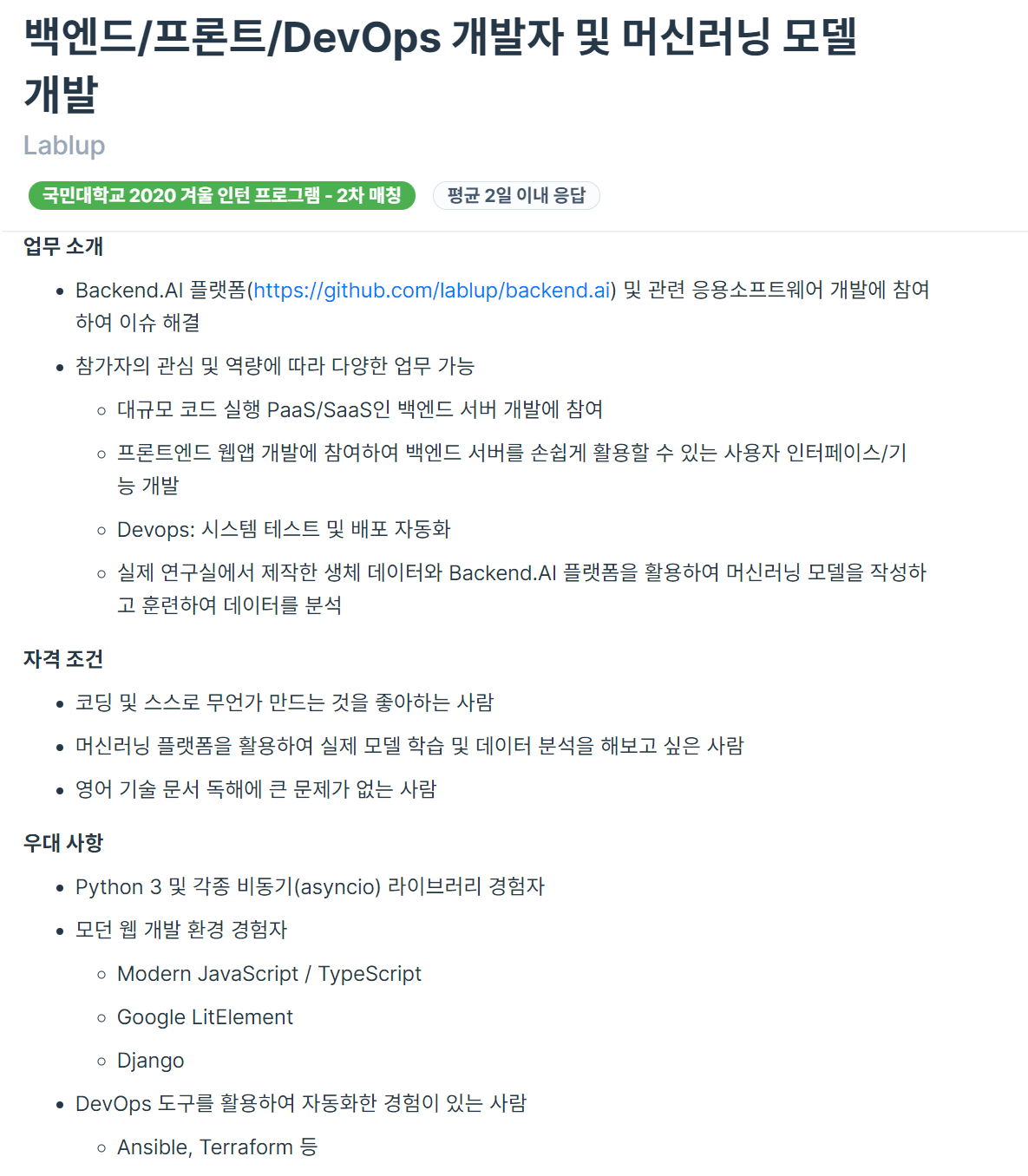
Seeing the Programmers job posting in the picture above, I was drawn to the phrases "various tasks possible depending on my interests and capabilities" and "someone who wants to experience actual model training and data analysis using a machine learning platform," so I applied. I had worked on many machine learning-related projects during my previous internship at Common Computer, and I felt I could contribute meaningfully.
After applying for the position, I had an interview with Jonghyun and was accepted.

What kind of company is Lablup?
Whenever I do an internship, there's something I always ask the seniors: What does the company develop and what is its business model (BM)? This is because I want to understand what kind of work my company does and what I'm helping to create.
A company that develops Backend.AI, an open-source resource management platform for AI research.
In a nutshell, it's a company that eliminates unnecessary hassles. ~~(Once you try it, you'll understand how much of a lifesaver it is)~~
When working on AI-related projects, there are many frustrating situations. Especially when preliminary setup is needed to run a model. Things like configuring dependencies required by the model, or manually installing tools to run the model. When using PyTorch or TensorFlow, I had to install various libraries used by the model one by one and manage their versions.
During a previous internship, a senior told me this:
I believe any problem that takes more than 30 minutes to solve is wasteful. While it's important to learn by working through challenges on your own, not all struggles are productive... If you're stuck for over 30 minutes, just ask me. And let's document this so others don't have to face the same problem!
These frustrating tasks are often just time-wasting obstacles, whether you realize it or not. Lablup helps with this through its product, Backend.ai. Through pre-built kernel images, users don't need to go through the aforementioned tedious and frustrating processes; they can just use it!
What Did I Do?
- Make Apache-Spark kernel Image
- Make Python kernel Image
- Make Minecraft Bedrock Server Image
- Docsprint
- Translate Backend.ai tutorial (English -> Korean)
In summary, these are the tasks I performed. The Python kernel image and Minecraft kernel image were practice for the main task of creating the Apache-Spark image. It was a kind of tutorial process, but perhaps due to my lack of understanding, I ran into many issues, especially with Apache-Spark, where I remember struggling quite a bit with troubleshooting. For Docsprint, Lablup manages its documents using Sphinx, and since the docs version was quite old, everyone in the company spent 1-3 days organizing the documentation. ~~(Maybe it's called Docsprint because it's Documentation + Sprint...?)~~ There was also a Backend.ai tutorial in PPT format, which I read and practiced with to understand what Backend.ai actually is. In the process, thinking there might be Korean clients, I worked with another intern to translate it into Korean.
Process of Making a Kernel Image
To create a kernel image, I followed roughly these steps:
- Get assigned a task from the project team
- Learn about the image for the assigned task
- Check necessary dependencies and write a Dockerfile
- Test the written Dockerfile on a local Macbook
- After testing, add the LABEL at the bottom
- Push the completed Dockerfile and service-def to the hub
- Test with backend.ai and troubleshoot
- PR & Code Review
- Merge
Troubleshooting for Apache-Spark
I'd like to share some challenges I encountered while creating the Spark kernel image. They can be summarized as follows:
- Issue where ENV settings in Dockerfile were not applied
- Error due to lack of permission for the directory created by
spark-master.shto write server logs - API endpoint error
1. Issue where ENV settings in Dockerfile were not applied
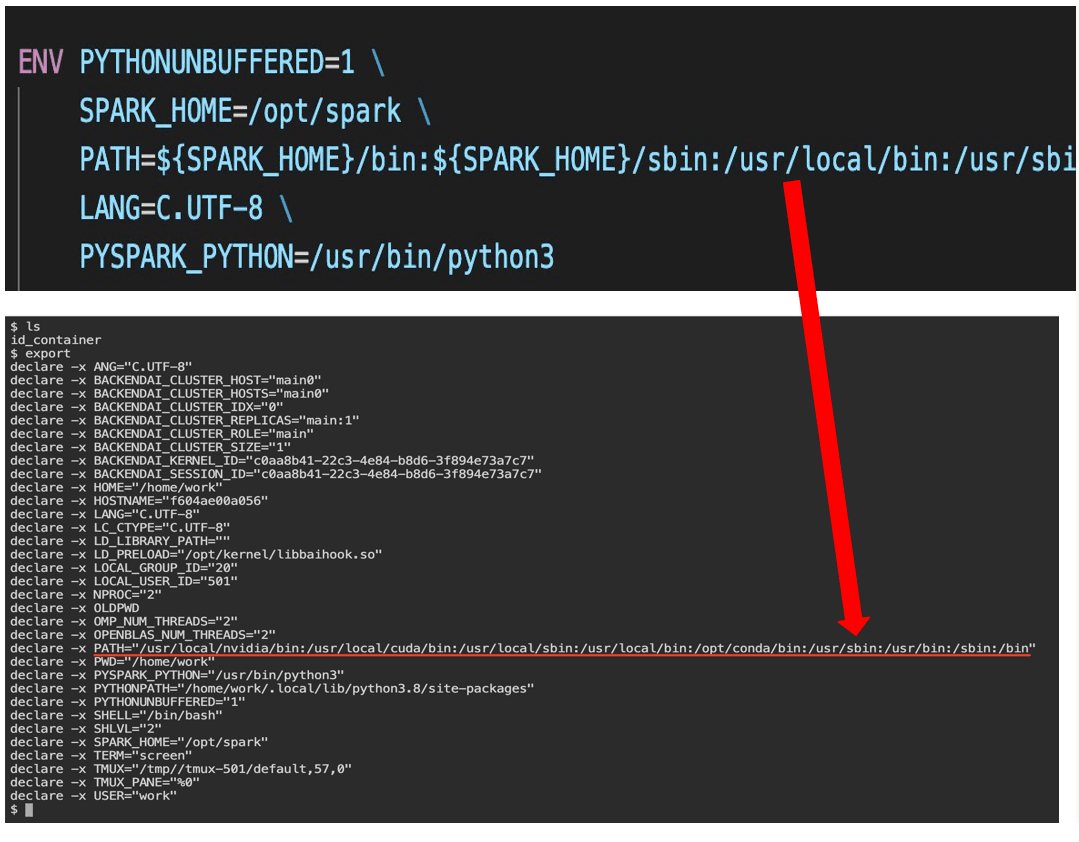
The first one was really frustrating. No matter what I did, it didn't work, so I asked for help... and the problem was simply that my backend.ai version was too outdated. It was a bug that had already been fixed, but due to my limited DevOps experience, I didn't realize I needed to pull updates frequently. After doing a git pull and resolving version conflicts, it was fixed immediately...
2. Permission denied issue
The second issue was that Spark binary files and package libraries were located under /opt, but the permissions granted by Backend.ai only allowed read and execute access to /opt, not write access.

This makes sense from a security perspective. To solve this, I used a bootstrap.sh file to copy the /opt/spark directory to /home/work when the container started. It wasn't an ideal solution, but it worked (though, as I'll explain later, I didn't ultimately solve it this way and changed this method when I encountered the third error).
3. API endpoint error
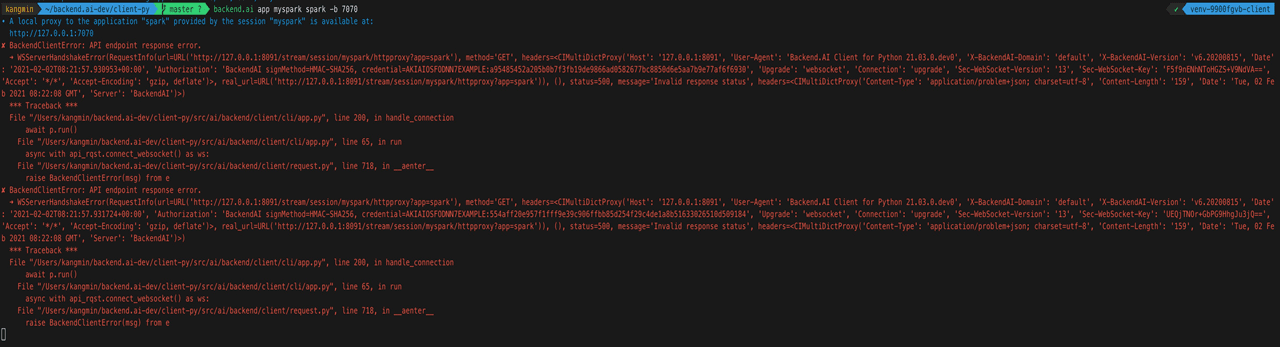
This problem occurred because the app took time to boot. So I thought, "Why not make it start immediately?!"
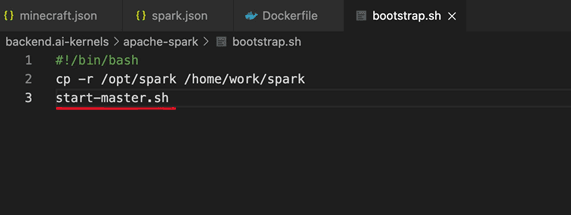
So, I made start-master.sh execute as soon as the container started. It ran well without errors, but a senior mentioned that "package binaries don't need to be under the home directory," so I had to fix both issues 2 and 3 together. In other words, I started optimization work.
Optimizing the Kernel Image
First, if I removed the package binaries from home, I had to remove the copying part in bootstrap.sh, which meant issue #2 wouldn't be solved. ~~(Wait... go back to how it was..?!!)~~ Luckily, there was a solution. A senior gave me a hint that for large projects like Spark, there should be a way to specify a separate working directory. And indeed, there was. I could specify a separate location using export SPARK_LOG_DIR in spark-env.sh. I added this to bootstrap.sh to solve it. This way, Spark could run with the necessary permissions.1
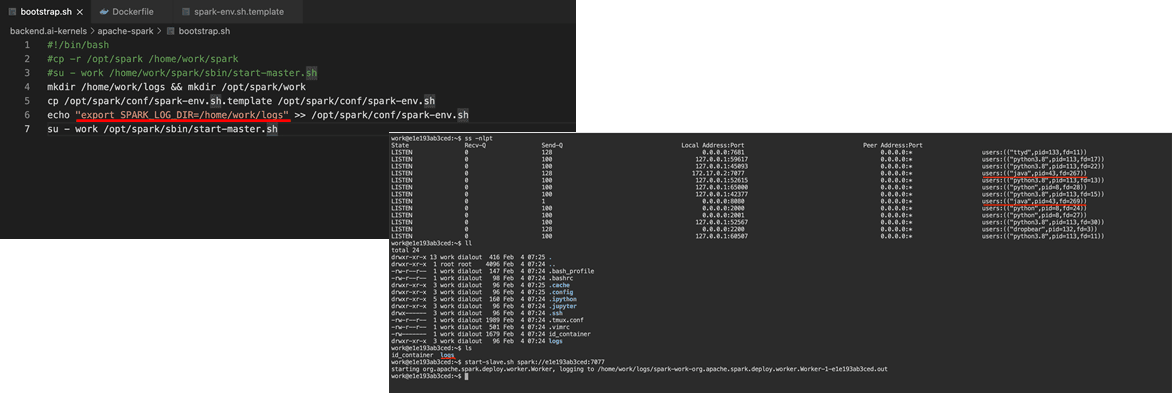
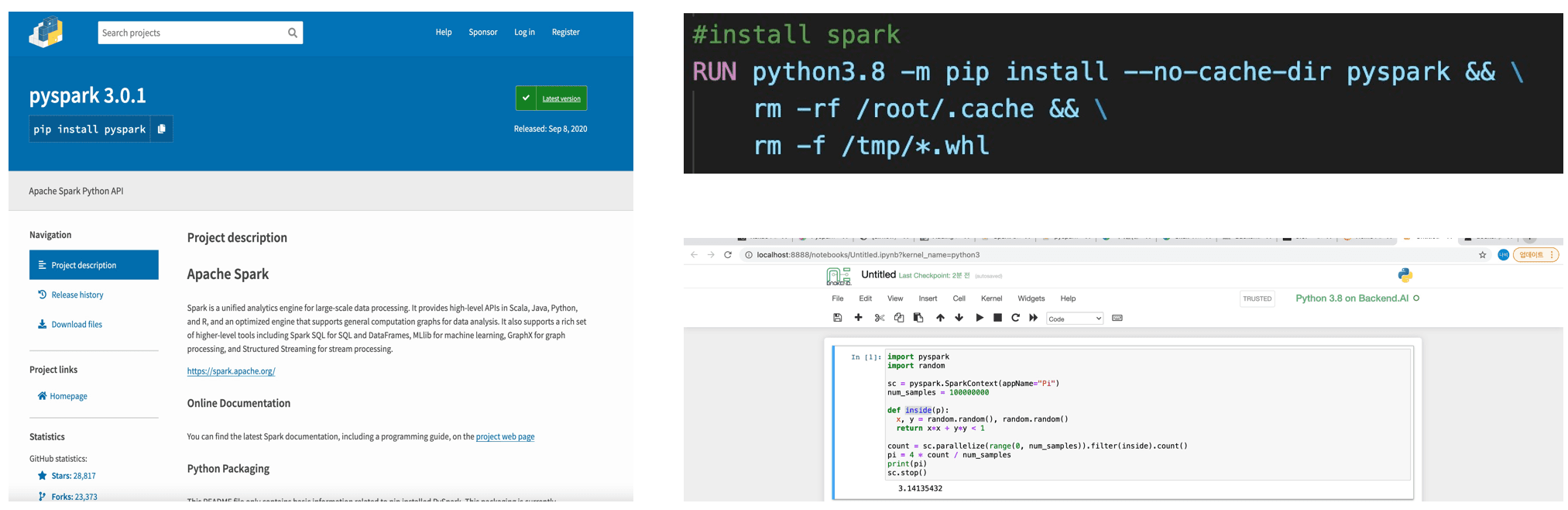
Then, I also worked on a task to make PySpark work with Jupyter Notebook. This was easy; after installing it via pip install in the Dockerfile, running Jupyter Notebook with backend.ai worked fine, as shown below.
Finally, leveraging the overlayfs characteristics in Dockerfile, I wrote the Dockerfile to be as similar as possible to the other existing Docker images.
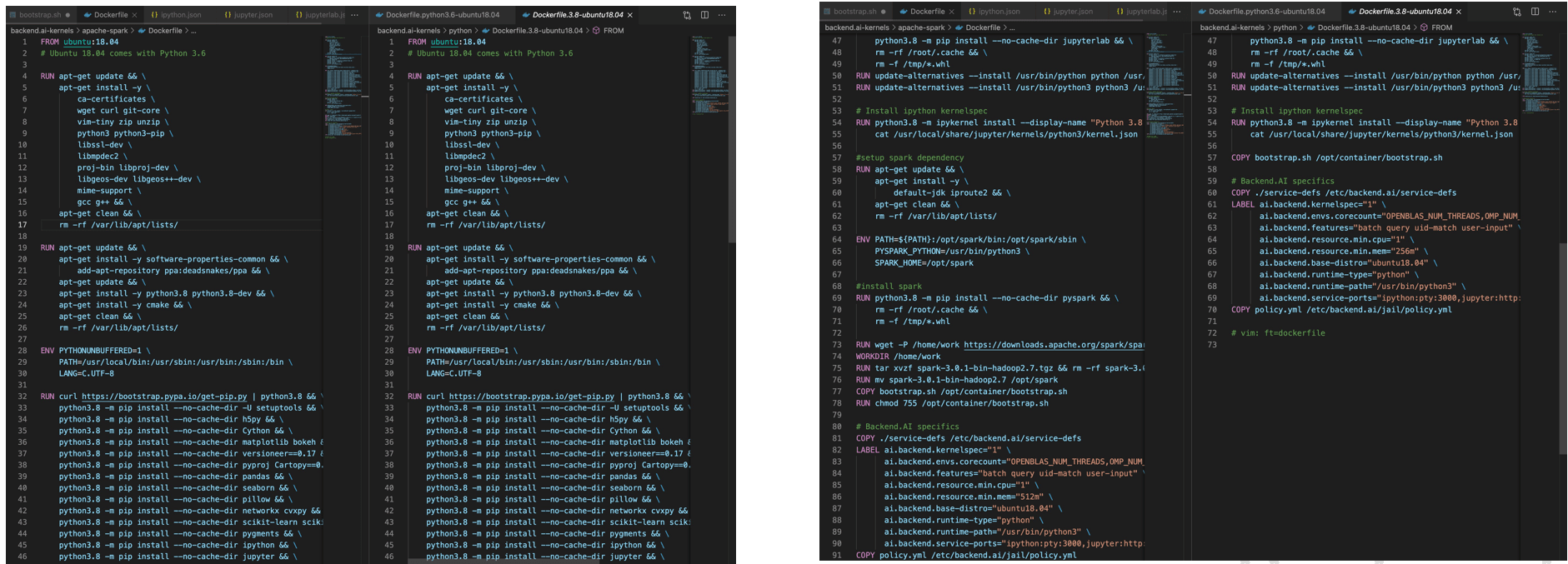
I had to use the common parts from other images as much as possible and defer the differing parts to later stages. This is essential for resource efficiency. It's not an issue when containers are small, but as images accumulate and their total size eventually reaches 40-50GB, the wasted resources can become quite significant, which is why such optimization work is important. 234
Contribution
After working through all the challenges, I finally succeeded in merging the Apache-Spark kernel image I created.
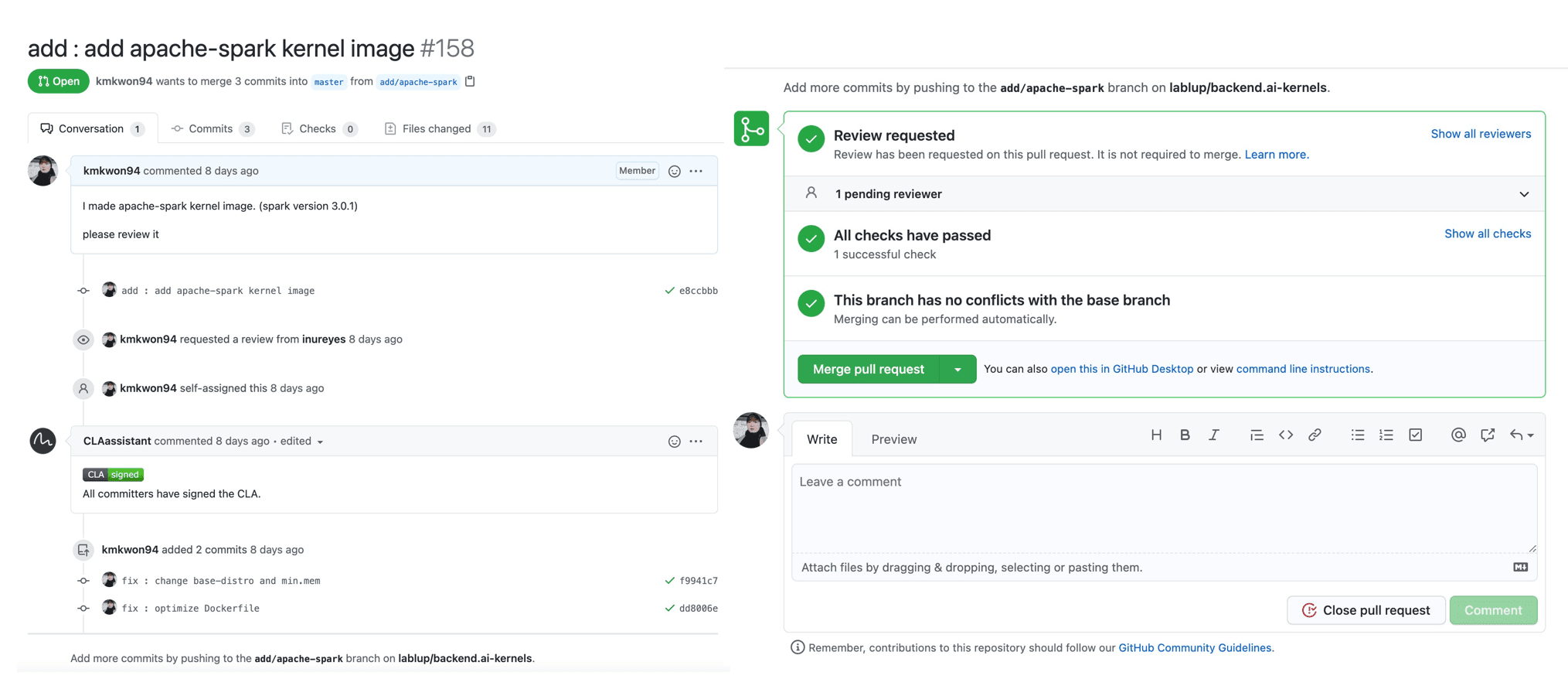
This internship was a very meaningful experience where I got to work with the backend.ai product and contribute by creating kernel images that people can use directly. Due to the impact of COVID-19, most of the work was remote, although I felt I would have enjoyed it more if I could have worked at the company office. On the last day, Jeonggyu mentioned that it was unfortunate we couldn't have a more in-depth internship where interns could ask questions in person about things they didn't know, and we could answer them directly, which I completely agreed with.
Working from home made it significantly harder to stay focused compared to working at the office. It felt about 1.5 times more difficult.
Next time, I hope to have the opportunity to meet face-to-face, chat about various things, and hear diverse perspectives beyond just development.
It was a valuable experience working with excellent people at a great company.
Footnotes
You may also like
Ready to lab | up with Lablup?
Apply now