- 012020 Winter Internship at Lablup
- 022020 Summer Internship Review
- 032021 Summer Lablup Internship Review
- 04Working at Lablup for 8 months
- 05My Summer Internship at Lablup
- 06My First Internship Experience at an IT Startup, Lablup
- 07Recap of my Lablup Internship, Summer 2022
- 08Recap of my Lablup Internship, Fall 2022
- 09Recap of my Lablup Internship, Summer 2023
- 10Recap of my Lablup Internship, Winter 2023
- 11Recap of my Lablup Internship, 2nd half 2024
- 12Beyond model training, experiencing AI infrastructure
Feb 16, 2022
Career
My First Internship Experience at an IT Startup, Lablup
 Yujung KimIntern
Application Process
I had the opportunity to apply for an internship at Lablup through the 2021 Open Source Contribution Academy.
Backend.AI was a large-scale and complex project, so the two-month program felt short, and I wanted to learn more about it. Despite my many shortcomings, I wondered, "Is there anything I can contribute?" However, I thought it was a great opportunity to experience real-world work, so I decided to apply. I learned a lot from my mentors while participating in the project, and they were all wonderful people with whom I wanted to continue working.
After passing the document screening, I had my first technical interview. I wasn't sure what questions to expect, so I studied a bit of everything, which I think was counterproductive. Since I had mainly done web front-end development, they asked me about web and front-end knowledge, but I couldn't answer many of the questions. I just did my best to respond. Fortunately, I received a call saying I had passed! Just four days later, I started my internship. The entire process, from the acceptance notice to the interview, moved very quickly.
Orientation
At Lablup, they develop and manage a solution called Backend.AI, so during orientation, I completed tasks involving installing and using the platform. Most of the tasks focused on developing machine learning models using Backend.AI. Having never studied machine learning before, I felt overwhelmed, but I managed to complete them somehow. During the internship, the most important lesson I learned was: "If you keep searching and trying, things eventually work out." When I didn't know something, I would ask for help; when an error occurred, I would fix it; and before I knew it, I had completed the task.
Here is a brief summary of the tasks I completed during orientation:
- Task 1. Change MNIST code to use Fashion MNIST
- Task 2. Increase accuracy without changing the model
- Task 3. Install Backend.AI
- Task 4. Run code on Backend.AI CLI
- Task 5. Run code on Backend.AI Web UI
- Task 6. Increase accuracy without changing the data
- Task 7. Increase accuracy within the time limit
Personally, Task 2 was the most challenging. I tried to increase accuracy using data augmentation techniques, but it didn't work as expected. I added flipped images to train the model, but strangely, adding vertically flipped images actually decreased the accuracy. The accuracy was highest when I only added horizontally flipped images, so I submitted the assignment with that approach.
Work
Backend.AI is implemented through the interaction of various components.
There are eight components in total: manager, agent, webui, common, client-py, kernels, storage-proxy, and webserver. During my internship, I resolved issues related to the manager, agent, webui, and common components. I'll summarize what I accomplished for each component.
Manager
This component provides APIs and is responsible for monitoring computing resources and scheduling sessions. As a core service, it handles many functions and contains extensive code. Understanding the code was challenging because the manager connects to all other components, but it was very helpful for grasping the overall architecture.
Adding a command (delete old records, free up disk space)
PR (Merged): https://github.com/lablup/backend.ai-manager/pull/498
-
Issue Description
Session information accumulates in thekernelstable of the database. This data needs to be deleted periodically, and a PostgreSQLVACUUMoperation must be performed to free up disk space.
→ Add anmgr clear-historycommand to easily perform this task. -
Process & What I Learned
I used a Python package called Click to create the CLI command and added two options to allow for more detailed commands.
However, when I ran the command, I encountered the following error during the vacuum operation:VACUUM cannot run inside a transaction blockI tried all the solutions from Stack Overflow and various other sites, but couldn't solve it.
In the end, the official documentation provided the answer. Commands likeCREATE DATABASEorVACUUMcannot be executed inside a transaction, so the mode had to be changed to AUTOCOMMIT. I solved it using the method below:conn.set_isolation_level(ISOLATION_LEVEL_AUTOCOMMIT) -
Reference: https://www.psycopg.org/docs/extensions.html#isolation-level-constants
Moving the location of the maximum container count check
PR: https://github.com/lablup/backend.ai-manager/pull/504
-
Issue Description
When creating a session, users can set conditions such as the session's name, type, resources, cluster mode, and cluster size. When such a session request is received, the manager must verify that the requirements are appropriate.
→ Move the check that verifies whether the maximum number of containers is exceeded to a more appropriate location. -
Process & What I Learned
Conditions that might change regarding whether a session can run after waiting in a queue (e.g., after another session finishes) are checked inpredicates. This check is re-run every few seconds to determine if the session has become runnable. However, if runnability is determined solely by policy options, regardless of whether other sessions have finished, there's no need to wait in the queue. Therefore, it's better to perform policy validation before placing the session in the queue.
The check for "whether the number of containers requested by the user exceeds the maximum number of containers" falls into the latter category. Therefore, I moved its location so the check is performed before the session is placed in the queue.
Adding a feature to change resource groups
PR: https://github.com/lablup/backend.ai-manager/pull/511
-
Issue Description
This issue involved adding a feature to change the resource group in the database'sagentstable. -
Process & What I Learned
I used Graphene, a library that provides tools for implementing GraphQL APIs. I added code to the existingModifyAgentmutation so it could also handle resource group change requests.
However, there was one problem. Approximately every 3 seconds, the resource group's configuration value is read from a TOML file and used to update the database, so any changes made through the mutation would be overwritten. Therefore, in addition to changing the database's resource group value through the Agent mutation, the value inagent.toml(the configuration file) also had to be updated.
→ I addressed this by adding an RPC method to the agent component that changes the resource group value in the TOML file, and then calling that method from the manager. More details below!
This was the last issue I worked on. To add this feature, the webui, manager, and agent components all needed updates. In webui, UI elements had to be added to send the change request, and the manager and agent had to be implemented to handle the request appropriately. I couldn't work on the webui, but I completed the manager and agent components and submitted PRs for them. (I plan to work on the webui once the PRs are merged.)
Agent
This component manages agent containers, and I had minimal work to do on it. Near the end of my internship, I began working on it to add the feature mentioned above.
Adding a resource group change feature
PR: https://github.com/lablup/backend.ai-agent/pull/327
-
Issue Description
I needed to add an RPC method to change the resource group in the TOML configuration file.
TheModifyAgentmutation will call this RPC method to change the resource group setting in the TOML file before updating the database. -
Process & What I Learned
This was my first time using thetomlkitlibrary, which helps you modify values while preserving human-added comments. There wasn't much documentation abouttomlkit, so I encountered some difficulties. I needed to read the file using its path, modify it, and save it again, but the official documentation only explainedparse, which creates a TOMLDocument object from a String. However, while usingparse, I encountered an error and by examining the source files, I found theapi.pyfile intomlkit. I learned how to use it by studying the functions defined in that file.Finally, I added the RPC method as follows:
async def update_scaling_group(self, scaling_group):
    cfg_src_path = config.find_config_file('agent')
    with open(cfg_src_path, 'r') as f:
        data = tomlkit.load(f)
    data['agent']['scaling-group'] = scaling_group
    with open(cfg_src_path, 'w') as f:
        tomlkit.dump(data, f)
    self.local_config['agent']['scaling-group'] = scaling_group
    log.info('rpc::update_scaling_group()')
I opened the file with read permission and used
loadto create a TOMLDocument object calleddata. Then I opened the file in write mode to save the modifieddata.
I initially wanted to avoid separating the read ('r') and write ('w') permissions. However, when I tried using 'r+' permission, the modified data was appended to the bottom of the original content instead of overwriting it, resulting in duplicated content. The separate approach was the only solution.
I learned a great deal abouttomlkitwhile working on this issue. Since there isn't much information available online, I think it would be valuable to write a separate post about it.
Common
Updating the TimeDuration Class
PR (Merged): https://github.com/lablup/backend.ai-common/pull/99
-
Issue Description
This issue is related to the PR for adding a command in the manager. TheTimeDurationclass returns the difference between two datetime objects. Theclear_history()function formgr clear-historyusesTimeDurationto calculate theexpiration_dateand deletes data prior to that date.
However,TimeDurationdidn't supportyearsandmonthsparameters. Initially, I wrote it like this:unit = retention[-2:] today = datetime.now() if unit == 'yr': yr = int(retention[:-2]) expiration_date = today - relativedelta(years=yr) elif unit == 'mo': mo = int(retention[:-2]) expiration_date = today - relativedelta(months=mo) else: duration = TimeDuration() expiration_date = today - duration.check_and_return(retention)If
TimeDurationsupported months and years, the code could be written more concisely like this:today = datetime.now() duration = TimeDuration() expiration = today - duration.check_and_return(retention) expiration_date = expiration.strftime('%Y-%m-%d %H:%M:%S')→ Update
TimeDurationto support months and years. -
Process & What I Learned
timedeltadoesn't haveyearsandmonthsarguments, so I had to usedateutil.relativedelta.relativedelta.dateutilis an extension package for thedatetimemodule.
Initially, I tried to unify the return type, butrelativedeltadoesn't support float-type arguments, so it failed the GitHub Action tests. Therefore, I only usedrelativedeltafor years and months. I also wrote test code for the first time:date = datetime(2020, 2, 29) ... assert iv.check('1yr') == relativedelta(years=1) assert iv.check('1mo') == relativedelta(months=1) assert date + iv.check('4yr') == date + relativedelta(years=4)ivis aTimeDurationobject. This test code verifies that it returns the desired value when '1yr' and '1mo' are passed. It also tests whether the calculation is correct for leap years.
Webui
Fixing the issue where the Terms/Privacy Policy window doesn't reopen after being closed
PR (Merged): https://github.com/lablup/backend.ai-webui/pull/1160
- Issue Description
As shown below, after closing the Terms of Service or Privacy Policy window by clicking the 'x' button, it wouldn't reopen when the button was clicked again.
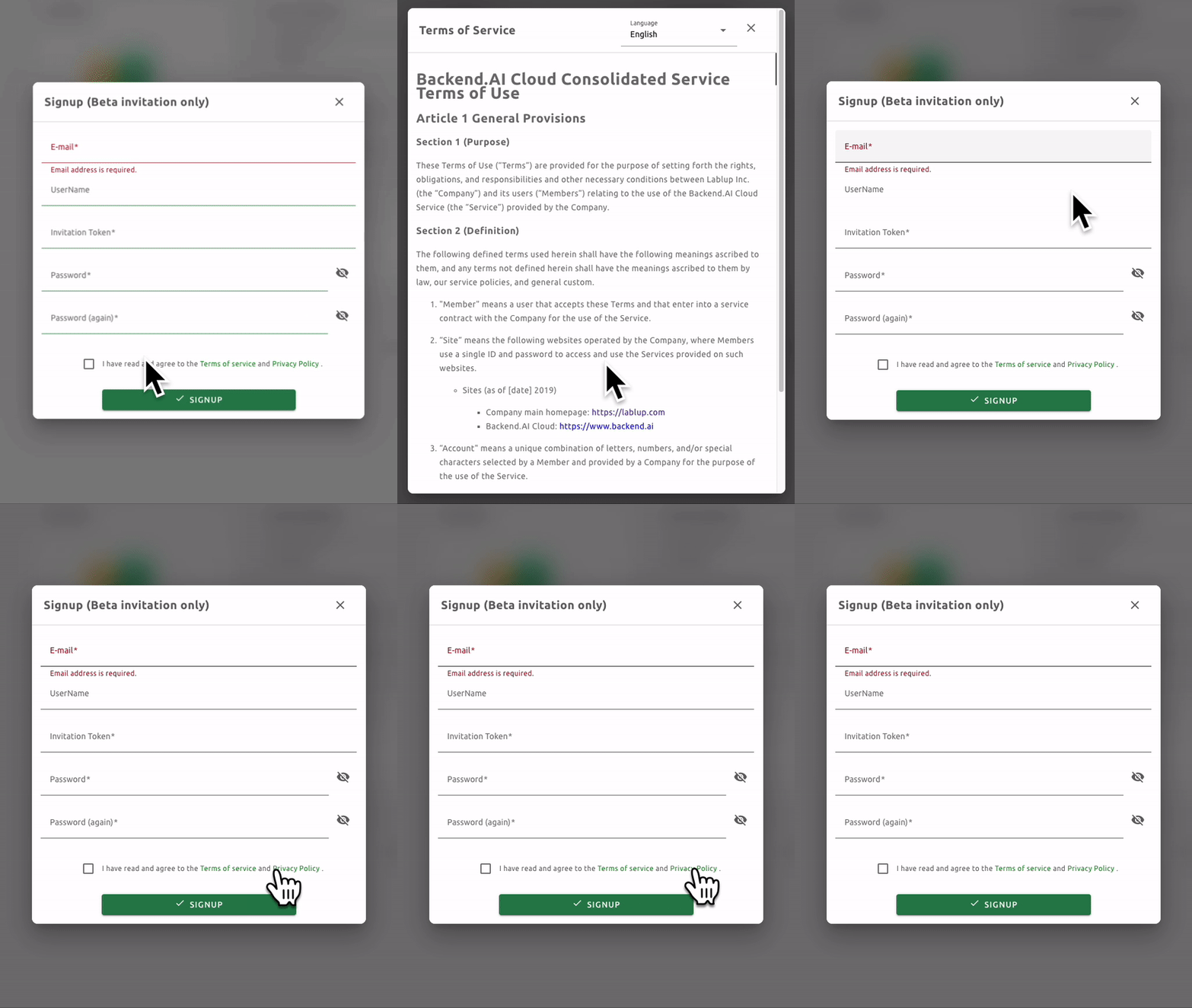
There were two buttons to close the window: 'x' and 'dismiss'. If closed using the dismiss button, the window would reopen properly. However, this wasn't the case for the x button.
→ Modify the functionality so that the window reopens even after being closed with the 'x' button.
- Process & What I Learned
Backend.AI webui uses Lit, a library for web components.
The Terms/Privacy Policy window had a structure where abackend-ai-dialogcomponent was nested inside alablup-terms-of-servicecomponent. The dismiss button exists within thelablup-terms-of-servicecomponent, while the x button exists within thebackend-ai-dialog.
→ Condition 1: When the x button is clicked, both components must close.
The window only opens when theshowvariable isfalse.
→ Condition 2: When the window closes, theshowvariable must be changed tofalse.
When closingbackend-ai-dialog, I dispatched a "dialog-closed"CustomEvent. Then I added anEventListenerfor it in thelablup-terms-of-servicecomponent. In the callback function, I added code to satisfy both conditions above.
Fixing the problem of overlapping items in a table
PR (Merged): https://github.com/lablup/backend.ai-webui/pull/1170
- Issue Description
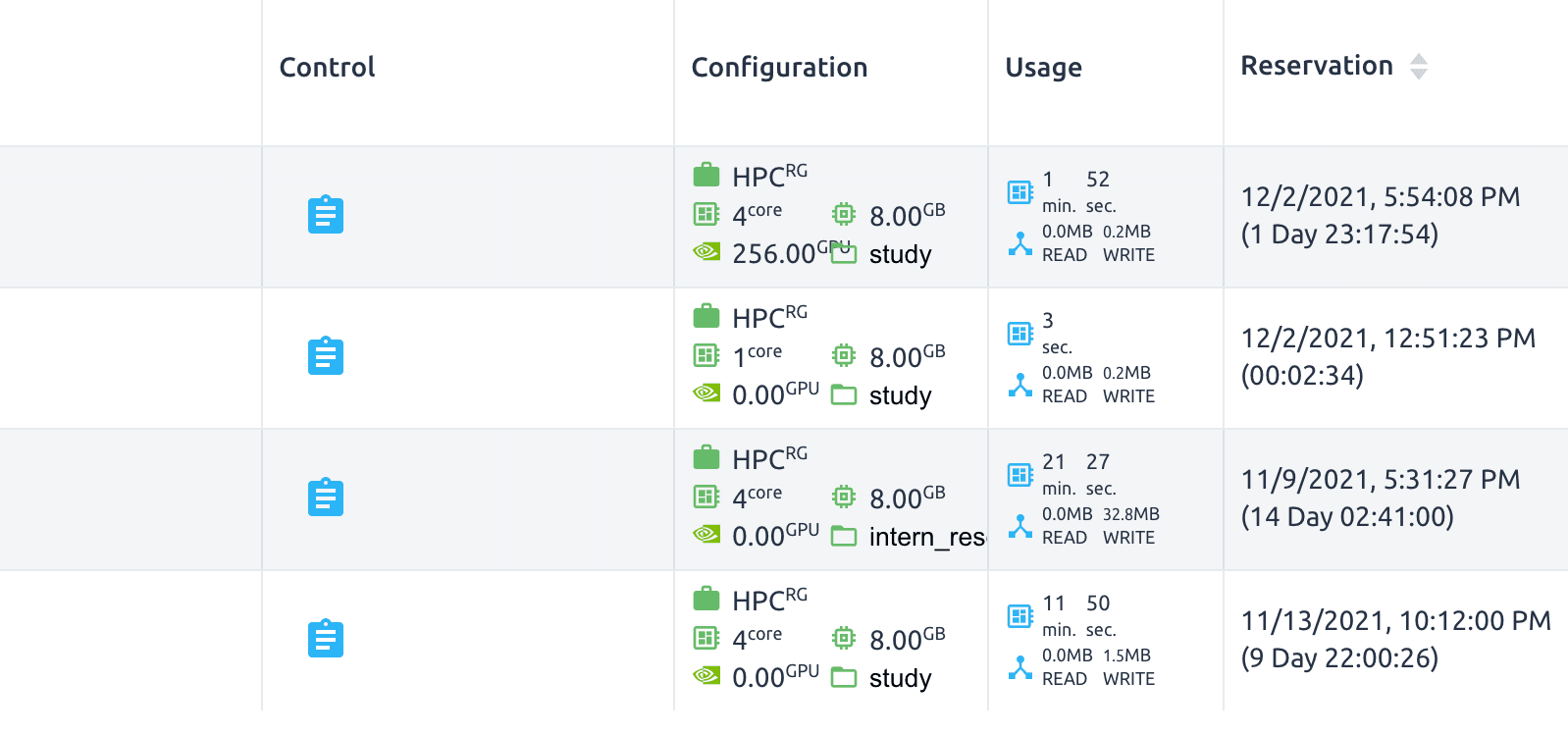
When a session's GPU value was three or more digits, it overlapped with the mount folder item on the right, as shown in the image below.
- Process & What I Learned
Initially, I considered solving this by making the GPU item's width increase dynamically. However, there were parts that didn't work as expected, so I asked for advice. My colleagues helped me brainstorm solutions to the problem, and through that conversation, I was able to find the right direction. Originally, I was so focused on fixing issues quickly that if I thought of a solution, I would immediately try to implement it without considering other approaches. However, while working on this issue, I realized the importance of taking time to view problems from the user's perspective and consider whether there might be better solutions.
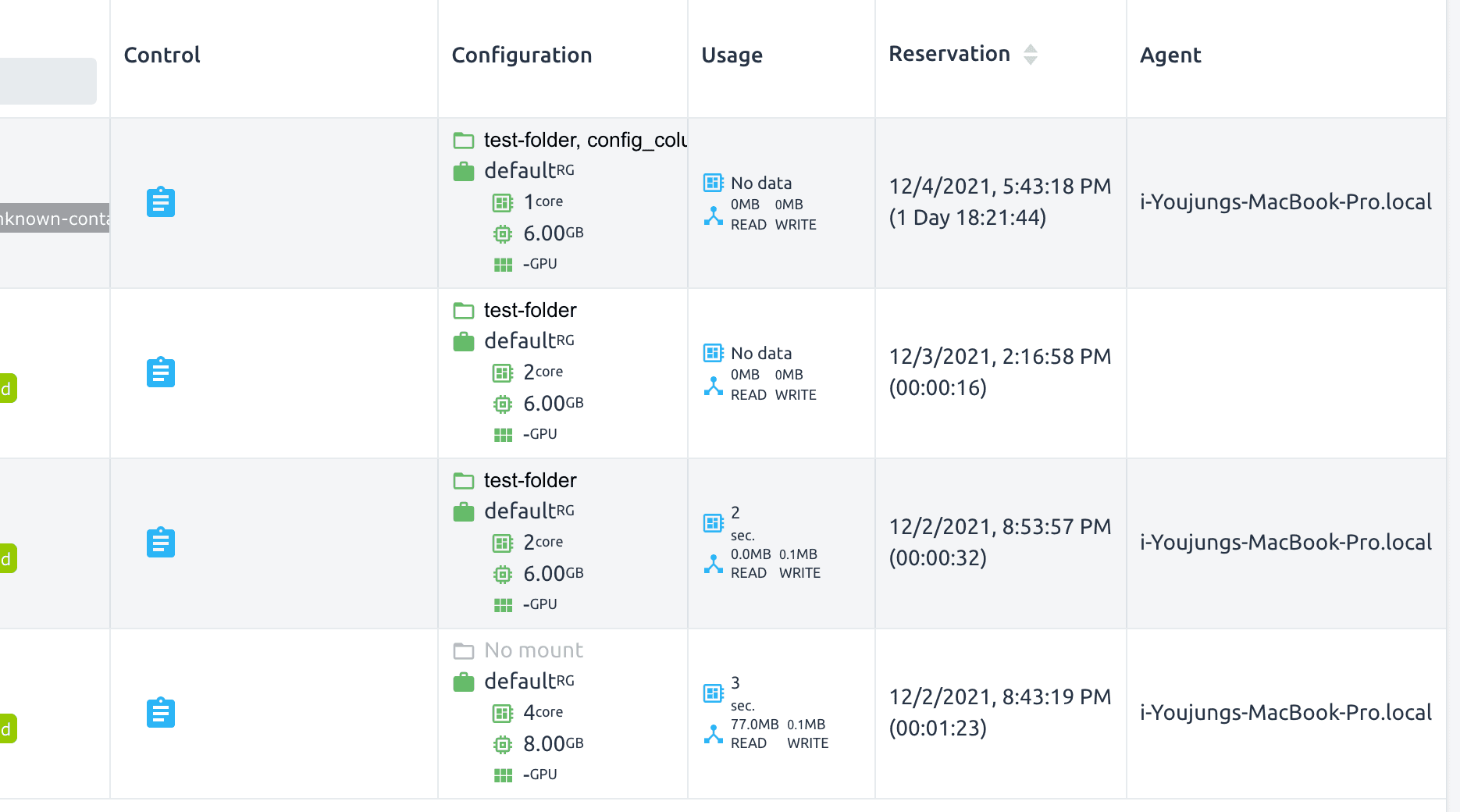
In the end, I solved the problem by changing the layout of the items as shown below, grouping related elements together.
Company Culture
To summarize in one phrase: it was very free and horizontal. Everyone is addressed by their name with "nim" attached (even the CEO!).
-
Work distribution is flexible
You don't exclusively do front-end or back-end work. You can experience a variety of tasks, which was the best part for me. This could be seen as both a pro and a con, but for me, it was definitely a pro. -
Flexible work hours + remote work
Working at the office twice a week was recommended, but this seemed to change depending on the COVID-19 situation. Arrival times are flexible, and departure times are also flexible. However, everyone works hard to match that freedom. -
Official language is English
There are foreign employees, so English is used in general meetings and for GitHub Issues & PRs. In company channels, if everyone in the conversation is Korean, you can write in Korean, but otherwise, you write in English. -
Lunch provided, gym subsidy, liberal vacation policy, use all your legal annual leave
Basically, if you work at the office, lunch is provided and we eat together. Of course, if you have a lunch appointment, you can eat separately. A portion of gym fees is subsidized, but I didn't use this benefit so I'm not sure about the details. The atmosphere regarding vacation was really liberal—you just have to give advance notice. Equipment is provided for each person. During the internship, I received a MacBook, mouse, and keyboard to use. -
When you don't know something, ask! Everyone is kind and explains things well
The hardest thing for me during the internship was asking questions. I was worried that colleagues would think I didn't know the basics, so I spent a lot of time researching and exploring on my own. As time went by, I realized the importance of asking questions. No one responds negatively—everyone explains things so well that I learned something new every time I asked. When I was struggling with an error, they would help me resolve it.
Two months is a short time to understand an entire company culture, but I've summarized what I experienced during that period. I had never considered working at a startup before, but my perspective changed significantly while working as an intern at Lablup. Everyone was constantly striving to create a positive company culture.
Review
When I started the internship, my mind was filled with worries. However, as I began to understand things step by step while resolving issues, it became increasingly enjoyable. I think I wrote that I wanted to work passionately with good people when asked about my motivation for applying, and it was exactly as I had hoped. Until then, I had only done front-end development, but I was able to experience back-end work. It was much more interesting than I had expected, so I plan to study more back-end development in the future.
Real-world work was definitely different from what I had experienced before. On GitHub, I had only used the code and pull request tabs, but I used Actions for the first time. I was able to learn how projects are managed and began using git commands more diversely. My perspective broadened significantly while working here, and I believe what I've learned will be very helpful in the future.
It was such an enjoyable and beneficial experience that the two months felt short. It's unfortunate that it has to end, but I plan to study hard so that I can meet them again as an improved version of myself.
You may also like
Ready to lab | up with Lablup?
Apply now